Maybe you’re already familiar with Dynamics NAV on your tablet. Well, things just got even more flexible. You can now experience the power and simplicity of the Microsoft Dynamics NAV Universal App on your preferred iOS, Android or Windows device – be it phone, phablet, tablet, laptop, or desktop – it’s all up to you. Switch to your favorite device on the go, during meetings, in the office, at home on the couch using the same app, accessing your Dynamics NAV business data from everywhere.
For more details see below link :-
https://blogs.msdn.microsoft.com/nav/2015/10/22/announcing-the-microsoft-dynamics-nav-universal-app-dynamics-nav-v2-0/
Showing posts with label App. Show all posts
Showing posts with label App. Show all posts
Thursday, 22 October 2015

Friday, 26 June 2015
Commenting and uncommenting multiple lines of C/AL Code
We can add and remove comment marks manually for each line till now. But from now the Comment Selection and Uncomment Selection options available in the Edit menu. The Comment Selection and Uncomment Selection options enable you to comment or uncomment multiple lines of code all at once.
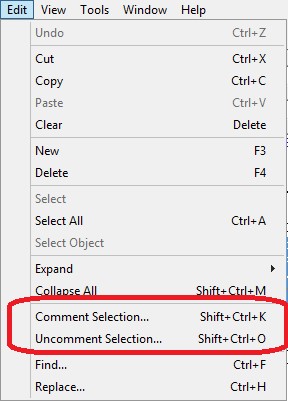
- To comment lines of code, select the lines, and then, in the Edit menu, choose Comment Selection (Shift+Ctrl+K).
- To uncomment lines of code, select the lines, and then choose Uncomment Selection (Shift+Ctrl+O).
Microsoft Dynamics NAV Tablet Client
In Microsoft Dynamics NAV 2015 Microsoft introduced a new interface called Microsoft Dynamics NAV for Tablet. The Microsoft Dynamics NAV for Tablet allows users in small and medium sized businesses to access data from a tablet. Developing for Microsoft Dynamics NAV for Tablet is very similar to developing for the Microsoft Dynamics NAV Web client using the Microsoft Dynamics NAV Development Environment.
To open Microsoft Dynamics NAV for Tablet in browser mode
Replace (http://NavisionWebClient:7080/DynamicsNAV80) with URL for Web Client in your environment.
How it looks:
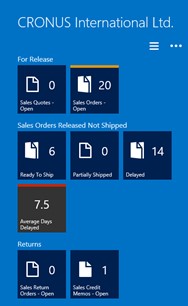
You will have to install below App: http://apps.microsoft.com/windows/en-in/app/d8a4908d-61f2-4740-b4fc-b559fbdd2e51
To open Microsoft Dynamics NAV for Tablet in browser mode
- The Role Center for the default company
http://NavisionWebClient:7080/DynamicsNAV80/WebClient/tablet.aspx
- The Role Center for a specific company
http://NavisionWebClient:7080/DynamicsNAV80/WebClient/tablet.aspx?company=CRONUS%20International%20Ltd.
- A specific page
http://NavisionWebClient:7080/DynamicsNAV80/WebClient/tablet.aspx?page=22
Replace (http://NavisionWebClient:7080/DynamicsNAV80) with URL for Web Client in your environment.
How it looks:
You will have to install below App: http://apps.microsoft.com/windows/en-in/app/d8a4908d-61f2-4740-b4fc-b559fbdd2e51
Subscribe to:
Posts (Atom)